
彩屏SIP電話圖像升級指南涵蓋所有型號的自定義壁紙、徽標、DSS鍵圖標規格、Photoshop創建、7-Zip包裝、Web UI和自動配置升級步驟。
彩色螢幕 IP 電話支援閒置螢幕桌布和標題標誌的自訂升級。H5 系列電話額外支援捷徑鍵圖示的自訂升級。有兩種升級方式:Web UI 升級和自動部署升級。支援的圖片格式:.bmp 和 .tar.gz。
1. 不同彩色螢幕電話型號的桌布規格:
表 1 - 彩色螢幕系列桌布規格
| 型號 | 解析度 W*H | 色彩深度 | 格式 | 檔案大小 | 檔案名稱 |
| BX3S/BX4 | 320*240 | 16bit RGB565 | bmp | ~150KB | 無限制 |
| BX3SG | 320*240 | 16bit RGB565 | bmp | ~150KB | 無限制 |
| BX3U | 320*240 | 16bit RGB565 | bmp | ~150KB | 無限制 |
| BX4U | 320*240 | 16bit RGB565 | bmp | ~150KB | 無限制 |
| BH5 | 480*320 | 16bit RGB565 | bmp | ~300KB | 無限制 |
| BX5S | 480*320 | 16bit /24bit RGB565 | bmp | ~300KB | 無限制 |
| BX5U | 480*320 | 16bit RGB565 | bmp | ~300KB | 無限制 |
| BX6-主螢幕 | 480*272 | 24bit RGB888 | bmp | ~380KB | 無限制 |
| BX6-副螢幕 | 240*320 | 16bit RGB565 | bmp | ~150KB | 無限制 |
| BX6U | 480 * 272 | 24bit RGB888 | bmp | ~380KB | 無限制 |
| BX7 | 800*480 | 24bit RGB888 | bmp | ~1.00MB | 無限制 |
| BX7C | 800*480 | 24bit RGB888 | bmp | ~1.00MB | 無限制 |
| GP210/GP210i-主螢幕 | 480*272 | 24bit RGB888 | bmp | ~380KB | 無限制 |
| GP210/GP210i-副螢幕 | 320*480 | 16bit RGB565 | bmp | ~300KB | 無限制 |
2. 不同彩色螢幕電話型號的 DSS 鍵圖示規格:
表 2 - 彩色螢幕型號的 DSS 鍵圖示規格
| 型號 | 解析度 W*H | 色彩深度 | 格式 | 檔案大小 | 檔案名稱 |
| BX3S/BX4 | - | - | - | - | - |
| BH5 | 54*54 | 16bit RGB565 | bmp | ~5KB | 請參閱表 3 |
| BX4U-側邊 | 25*25 | 32bit | Png | ~3KB | 請參閱表 4 一般 DSSkey |
| BX4U-副螢幕 | 42*42 | 32bit | Png | ~3KB | 請參閱表 4 一般 DSSkey |
| BX5U-側邊 | 25*25 | 32bit | Png | ~3KB | 請參閱表 4 一般 DSSkey |
| BX5U-副螢幕 | 42*42 | 32bit | Png | ~3KB | 請參閱表 4 一般 DSSkey |
| BX6U-側邊 | 25*25 | 32bit | Png | ~3KB | 請參閱表 4 一般 DSSkey |
| BX6U-副螢幕 | 42*42 | 32bit | Png | ~3KB | 請參閱表 4 一般 DSSkey |
| BX5S | - | - | - | - | - |
| BX6-副螢幕 DSS | 42*42 | 32bit | Png | ~3KB | 請參閱表 4 一般 DSSkey |
| BX7 | - | - | - | - | - |
| BX7C | 31*31 | 32bit | Png | ~4KB | 請參閱表 4 側邊 DSSkey |
| GP210/GP210i-側邊 | 25*25 | 32bit | Png | ~2KB | 請參閱表 4 側邊 DSSkey |
| GP210/GP210i-副螢幕 DSS | 42*42 | 32bit | Png | ~3KB | 請參閱表 4 一般 DSSkey |
3. BH5 電話的閒置螢幕快速撥號圖示命名:
表 3 - H5 電話自訂圖示命名
| 檔案類型 | 檔案名稱 | 格式 | 檔案大小 | 解析度 WxH |
| 接待 | ICON_RECEPTION | bmp | ~5KB | 54x54 |
| 服務 | ICON_SERVICE | bmp | ~5KB | 54x54 |
| 清潔 | ICON_CLEANING | bmp | ~5KB | 54x54 |
| 喚醒 | ICON_WAKEUP | bmp | ~5KB | 54x54 |
| 緊急 | ICON_EMG | bmp | ~5KB | 54x54 |
| 管理員 | ICON_MANAGER | bmp | ~5KB | 54x54 |
注意:捷徑鍵圖片的背景色必須為黑色,以移除背景並在 LCD 螢幕上顯示圓形圖示。
4. 彩色螢幕電話的閒置螢幕 DSS 鍵圖示命名:
表 4 - DSS 與側邊 DSS 鍵圖示
| DSSkey 類型 | 側邊 DSSkey 圖示名稱 | 一般 DSSkey 圖示名稱 |
| BLF 清單 | side_custom_dss_blflist.png | custom_dss_blflist.png |
| DTMF | side_custom_dss_dtmf.png | custom_dss_dtmf.png |
| 無 | side_custom_dss_edit.png | custom_dss_edit.png |
| 按鍵事件 | side_custom_dss_keyevent.png | custom_dss_keyevent.png |
| 線路 | side_custom_dss_line.png | custom_dss_line.png |
| URL 與動作 URL | side_custom_dss_url.png | custom_dss_url.png |
| 群播 | side_custom_dss_mcast.png | custom_dss_mcast.png |
| 記憶鍵/駐留轉接 | side_custom_dss_mem_axfer.png | custom_dss_mem_axfer.png |
| 記憶鍵/盲轉接 | side_custom_dss_mem_bxfer.png | custom_dss_mem_bxfer.png |
| 記憶鍵/通話駐留 | side_custom_dss_mem_callpark.png | custom_dss_mem_callpark.png |
| 記憶鍵/通話轉接 | side_custom_dss_mem_cfw.png | custom_dss_mem_cfw.png |
| 記憶鍵/會議 | side_custom_dss_mem_conf.png | custom_dss_mem_conf.png |
| 記憶鍵/DTMF | side_custom_dss_mem_dtmf.png | custom_dss_mem_dtmf.png |
| 記憶鍵/對講機 | side_custom_dss_mem_intercome.png | custom_dss_mem_intercome.png |
| 記憶鍵/MWI | side_custom_dss_mem_mwi.png | custom_dss_mem_mwi.png |
| 記憶鍵/新通話 | side_custom_dss_mem_newcall.png | custom_dss_mem_newcall.png |
| 記憶鍵/出席 | side_custom_dss_mem_present.png | custom_dss_mem_present.png |
| 記憶鍵/快速撥號 | side_custom_dss_mem_spdial.png | custom_dss_mem_spdial.png |
彩色螢幕電話的標題標誌規格:
注意:BX5S 和 BX6 系列暫時不支援自訂標題標誌升級。
| 型號 | 解析度 WxH | 色彩深度 | 格式 | 檔案大小 | 檔案名稱 |
| BX3S/BX4/BH5/D5 | W ≤ 螢幕寬度;H < 標題列高 | 16bit RGB565 | bmp | ~10KB | TITLE_LOGO |
標題列高度 (titlebarH):
A: H5 = 40px
B: BX3S/BX4/D5 = 35px
Adobe Photoshop
開啟 Photoshop → 開啟您的圖片 → 影像 → 影像尺寸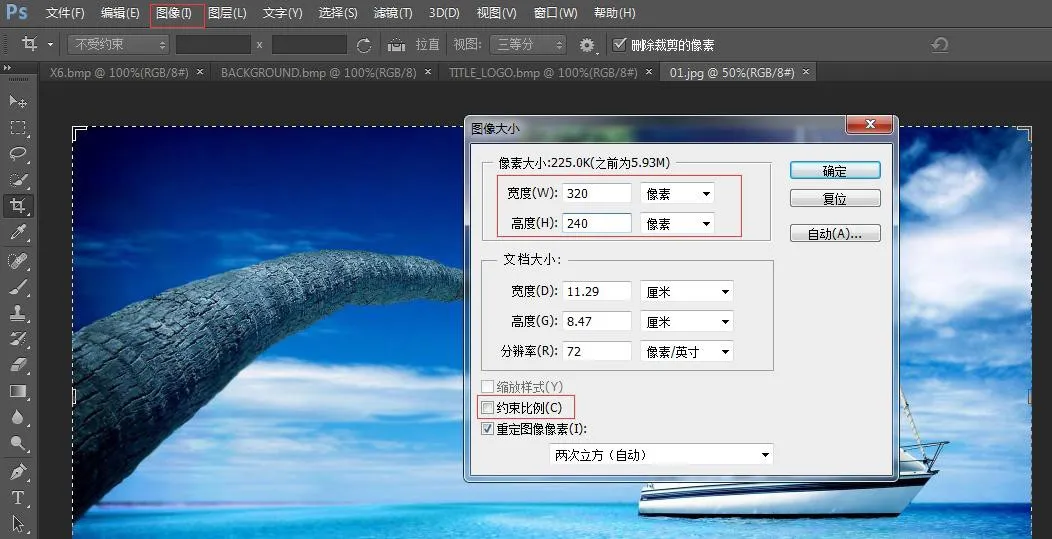 <
根據您的電話型號設定寬度和高度。 取消勾選「維持長寬比」 → 按一下「確定」
<
根據您的電話型號設定寬度和高度。 取消勾選「維持長寬比」 → 按一下「確定」
檔案 → 另存新檔 → 選擇 BMP 格式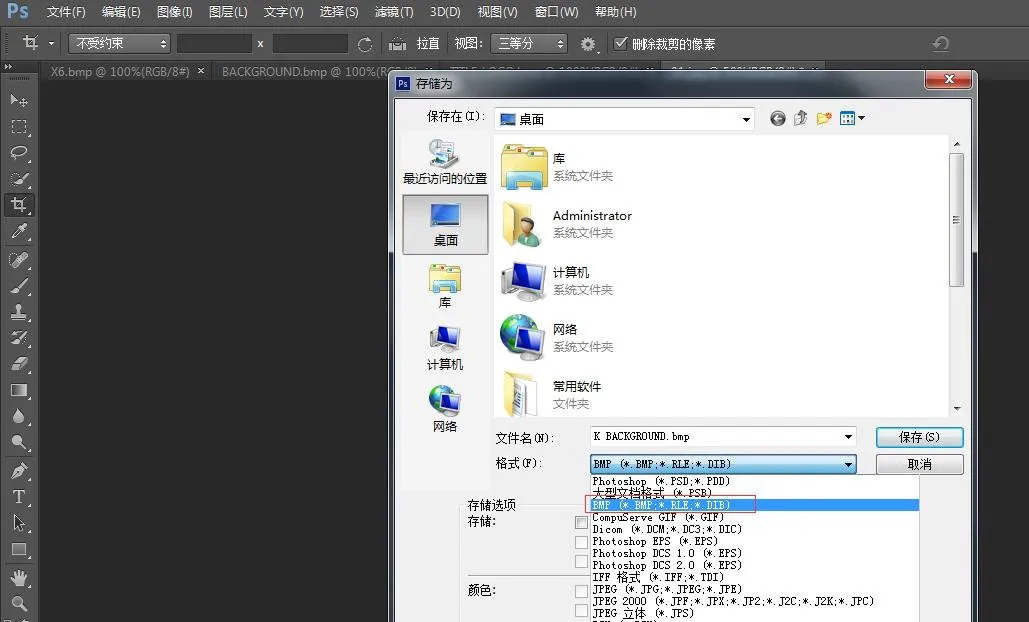
按一下「儲存」,如圖所示選擇正確的色彩深度: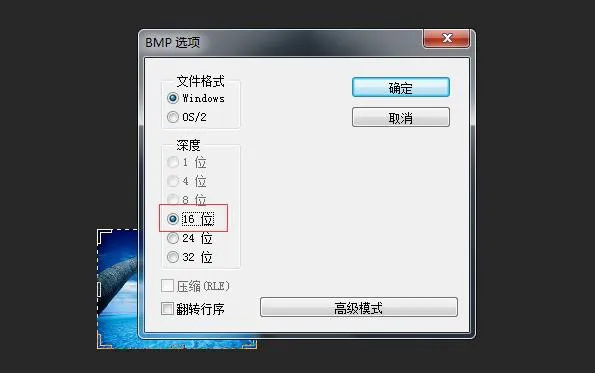 <
為您的電話型號選擇相符的色彩深度 → 確定。圖片建立完成。
<
為您的電話型號選擇相符的色彩深度 → 確定。圖片建立完成。
3. 標題標誌、快速撥號和 DSS 鍵圖示使用相同的建立方法。
4. 如何建立 etc.tar.gz 套件
使用 7-Zip 工具 (範例:ICON_SERVICE.bmp)
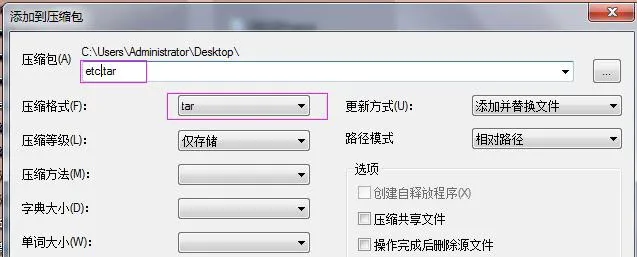
1) 在檔案上按右鍵 → 7-Zip → 加到壓縮檔 → 壓縮格式:tar → 確定 → 產生 etc.tar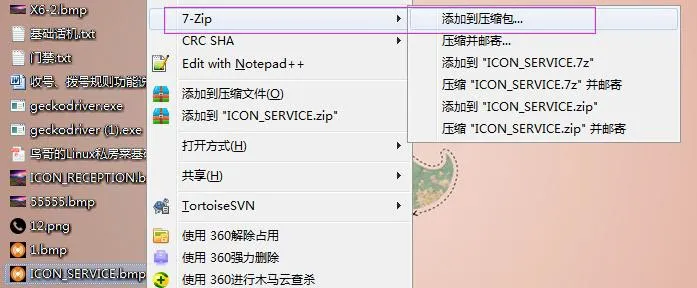
2) 在 etc.tar 上按右鍵 → 7-Zip → 加到壓縮檔 → 壓縮格式:gzip → 確定 → 產生 etc.tar.gz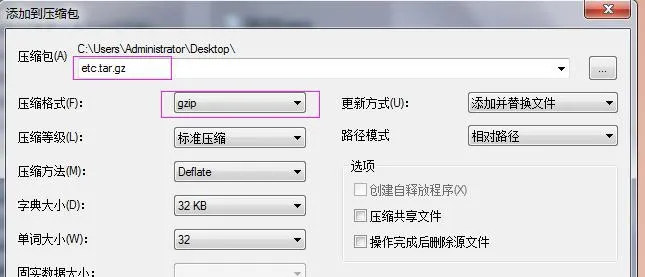
BX3S/BX4/BH5 桌布升級
H5 支援桌布、標題標誌和閒置快速撥號圖示升級。
登入電話 Web UI → 電話設定 → 進階 → 螢幕影像。在此處上傳 .bmp 或 etc.tar.gz 檔案。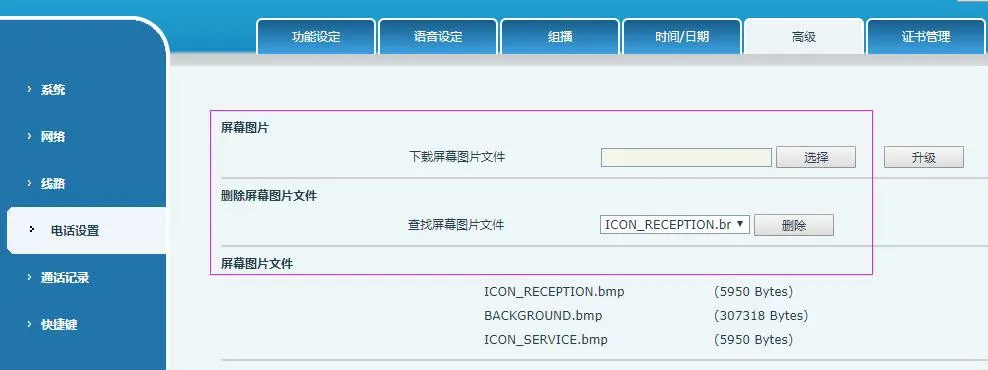 <
成功升級後,您可以在這個頁面檢視和刪除影像。
<
成功升級後,您可以在這個頁面檢視和刪除影像。
BX5S/BX6/BX7/BX7C/GP210/GP210i 桌布升級
登入電話 Web UI → 系統 → 升級 → 桌布升級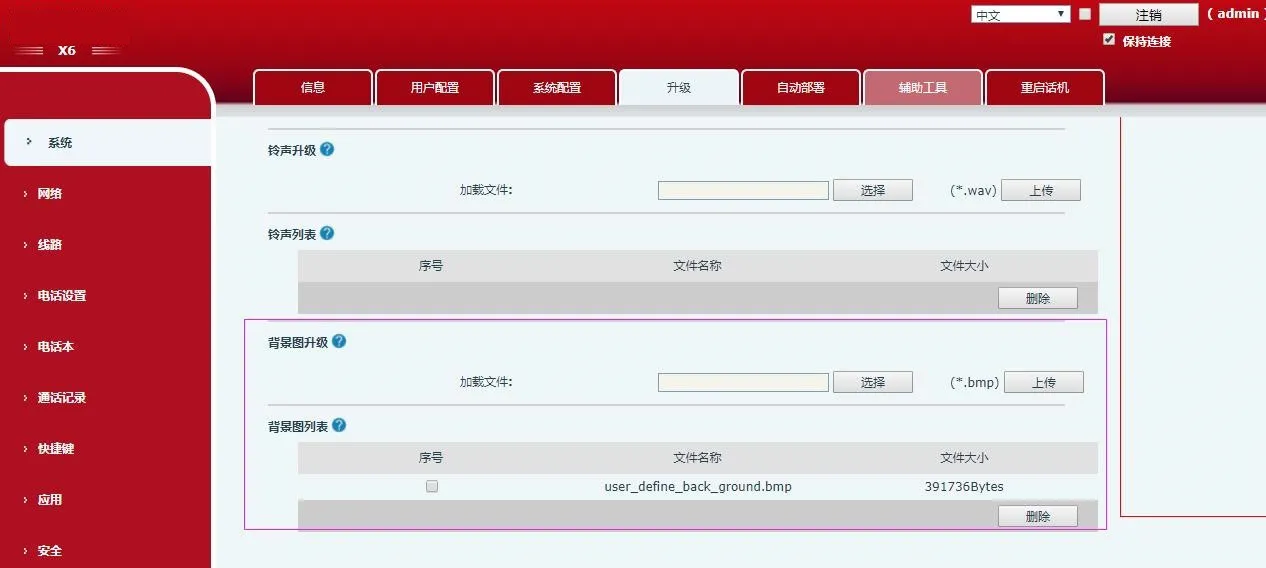 <
成功升級後,您可以在這個頁面檢視和刪除桌布。
<
成功升級後,您可以在這個頁面檢視和刪除桌布。
BX4U/BX5U/BX6U/BX5S/BX6/BX7/BX7C/GP210/GP210i DSS 鍵圖示升級 (2 種方法)
1) 直接升級 (.png)
Web UI:系統 → 升級 → DSSkey 圖示升級。上傳自訂圖示(必須遵循表 4 的命名規則)。升級後的圖示會顯示在 DSS Key 圖示清單中。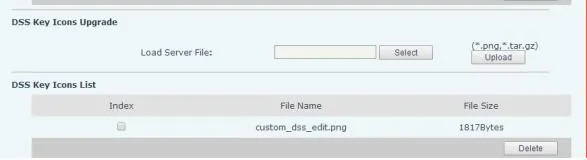
2) 批次升級 (.tar.gz)
用於大量圖示升級,請使用 .tar.gz 套件(支援自訂名稱)。
① Linux 打包命令:tar –zcvf etc.tar.gz xxx.png xxx1.png
② Windows 打包 (7-Zip):
- 選取檔案 → 按右鍵 → 7-Zip → 加到壓縮檔 → tar → 確定 (建立 etc.tar)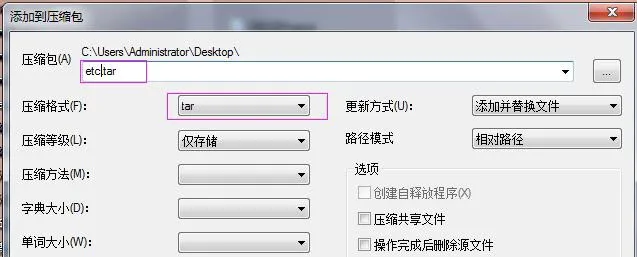 - 在 etc.tar 上按右鍵 → 7-Zip → 加到壓縮檔 → gzip → 確定 (建立 etc.tar.gz)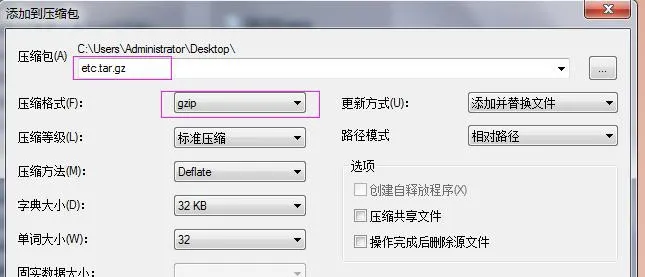
升級後,在 Web UI 上選取自訂 DSS 鍵圖示。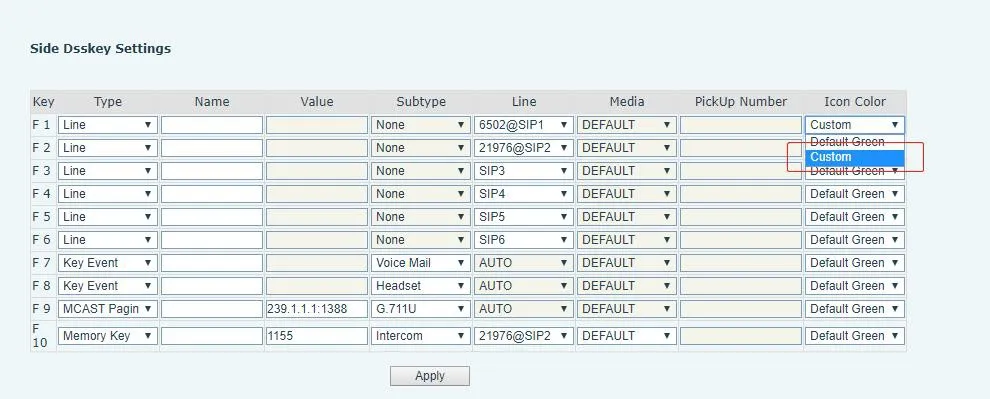
BX34 系列自動部署 (桌布、標題標誌;H5 支援快速撥號圖示)
在設定檔案的
| Auto | Etc | Url | : ftp://1:1@172.16.6.62/BACKGROUND.bmp |
| Auto | Etc | Url | : ftp://1:1@172.16.6.62/TITLE_LOGO.bmp |
| Auto | Etc | Url | : ftp://1:1@172.16.6.62/etc.tar.gz |
設定範例 (BACKGROUND.bmp):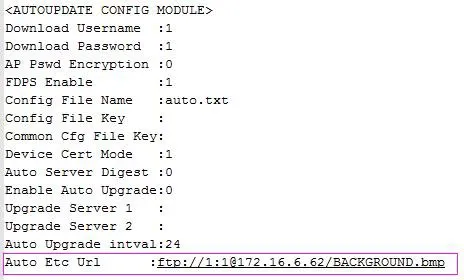
BX4U/BX5U/BX6U/BX5S/BX6/BX7/BX7C/GP210/GP210i 對桌布和 DSS 鍵圖示使用相同的自動部署方法(不支援標題標誌)。檔案名稱可自訂。
範例 (BX6):
Auto Etc Url : ftp://1:1@172.16.6.62/X6.bmp
Auto Etc Url : ftp://1:1@172.16.6.62/etc.tar.gz