
本指南詳細介紹瞭如何使用FTP和Telnet在POST模式下升級基於Vxworks的SIP對講設備,包括固件準備、FTP設置和完整升級步驟。
本文適用於使用VxWorks作業系統的工業設備。SIP話機的POST模式功能類似於電腦的BIOS,韌體則相當於電腦的作業系統。 如果電腦當機,可重新安裝作業系統;同理,若話機無法正常開機,可透過POST模式升級恢復系統。
BHP-SOS12、BHP-SOS12V、BHP-SOS18、Bi20S、Bi30S、Bi31S、Bi23S、Bi32V、Bi33V、BK-ROIP-PA2。
從以下網址下載設備對應的最新韌體: https://www.fanvil.com/Support/download.html 若不確定使用哪款韌體或使用客製版本,請聯絡技術支援。
注意: 韌體檔案必須為.z格式。該檔案並非zip壓縮檔,切勿解壓縮。
FTP工具:使用wftpd32(也支援其他FTP軟體)。 wftpd32下載位址:http://download.fanvil.com/HowTo/UpdateInPostMode/wftpd32.rar 在電腦上執行wftpd32軟體。
開啟安全設定
操作路徑:Security → User/rights...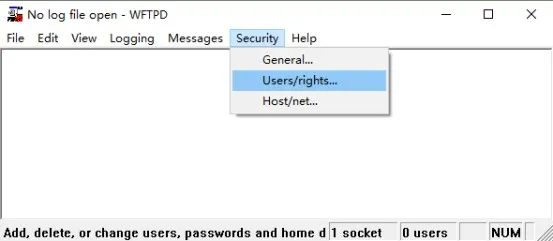
建立使用者
點擊New User...,設定使用者名稱和密碼(請牢記後續使用)。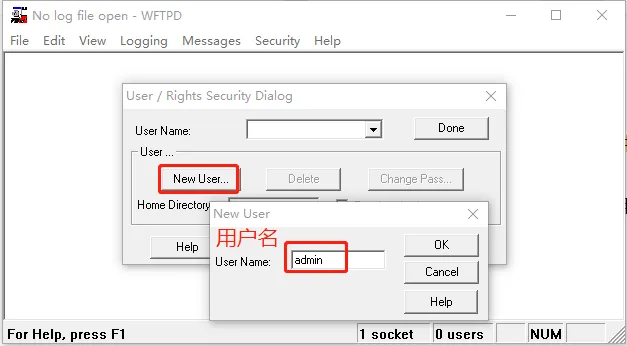
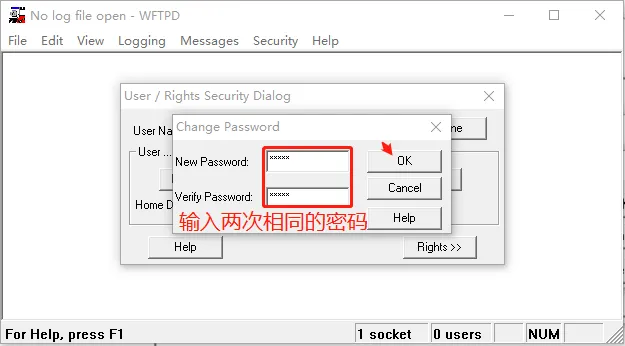
設定主目錄
輸入存放.z格式韌體的資料夾路徑(無須包含檔案名稱)。點擊Done。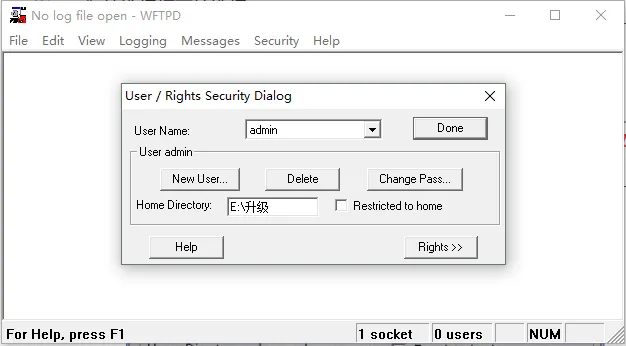
啟用紀錄檔(選用)
操作路徑:Logging → Log Options,勾選Enable Logging。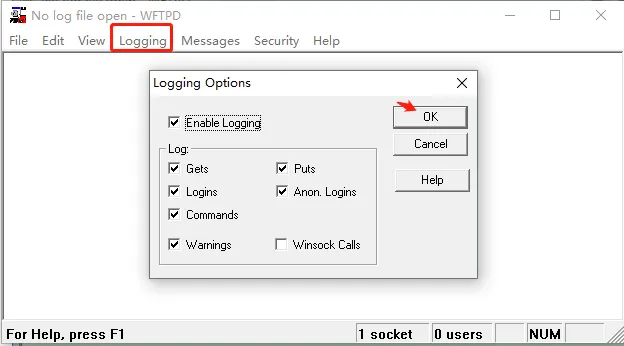
警告: POST升級過程中請勿關閉FTP伺服器。
進入POST模式
將電腦連接至設備的WAN埠(同一區域網路),重新開機設備。
- i12/i16V/i18S/i20S/i30S/i31S/i23S/i32V/i33V設備:長按* + #鍵10秒。
- PA2設備:長按音量+ + 音量-鍵10秒。
設定電腦靜態IP
將電腦IPv4位址設定為:192.168.10.2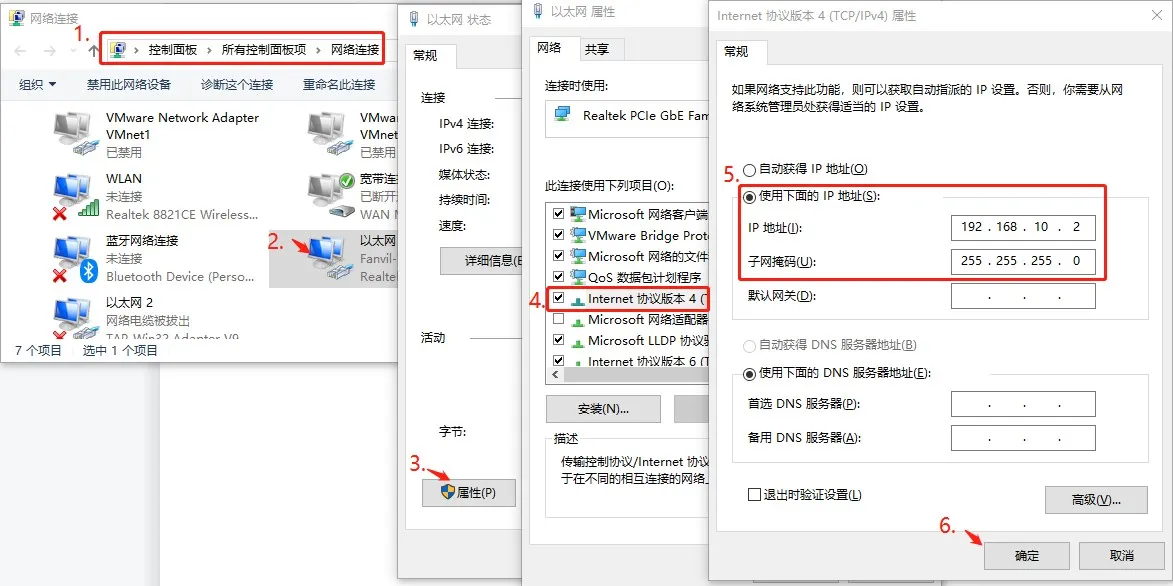
方法1:電腦直連設備WAN埠
方法2:同一區域網路連接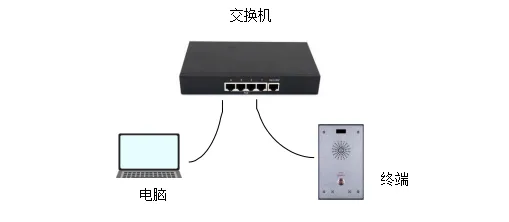
開啟命令提示字元
按下Win + R,輸入cmd,按Enter鍵。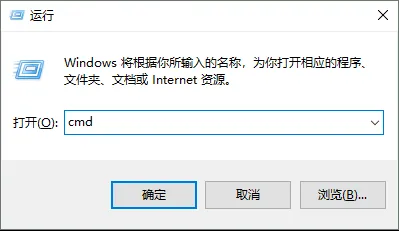
Telnet連接設備
執行命令:telnet 192.168.10.1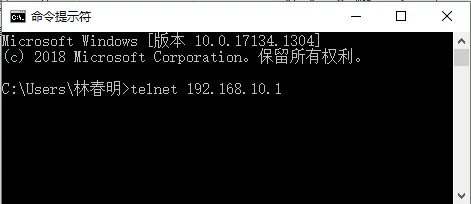
注意: 若未啟用Telnet功能,可透過Windows功能安裝,或使用PuTTY/SecureCRT等工具。
開始升級
輸入2並按Enter鍵,依序輸入以下資訊(每項輸入後按Enter):
- 伺服器位址:192.168.10.2
- 映像檔名稱:xxx.z(對應韌體檔案)
- 使用者名稱:FTP使用者名稱
- 密碼:FTP密碼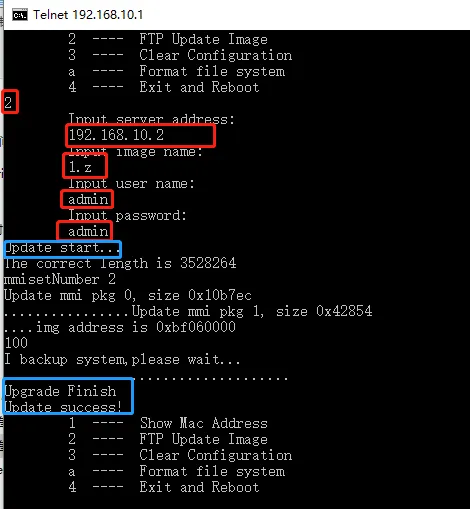
注意: 僅使用.z格式檔案,如需可顯示檔案副檔名。
檢視FTP狀態
FTP視窗會顯示下載進度,出現成功提示即代表完成。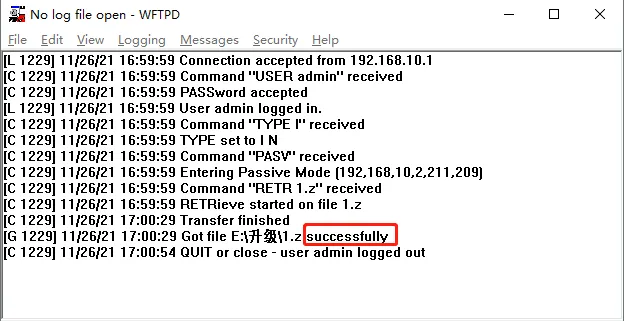
注意: 若升級失敗,關閉電腦防火牆後重試。
升級成功後:
在POST模式下,輸入3清除所有設定(保持設備通電)。
輸入4重新開機設備。
設備重新開機後,登入網頁管理介面驗證韌體版本及設備運作狀態,升級完成。