
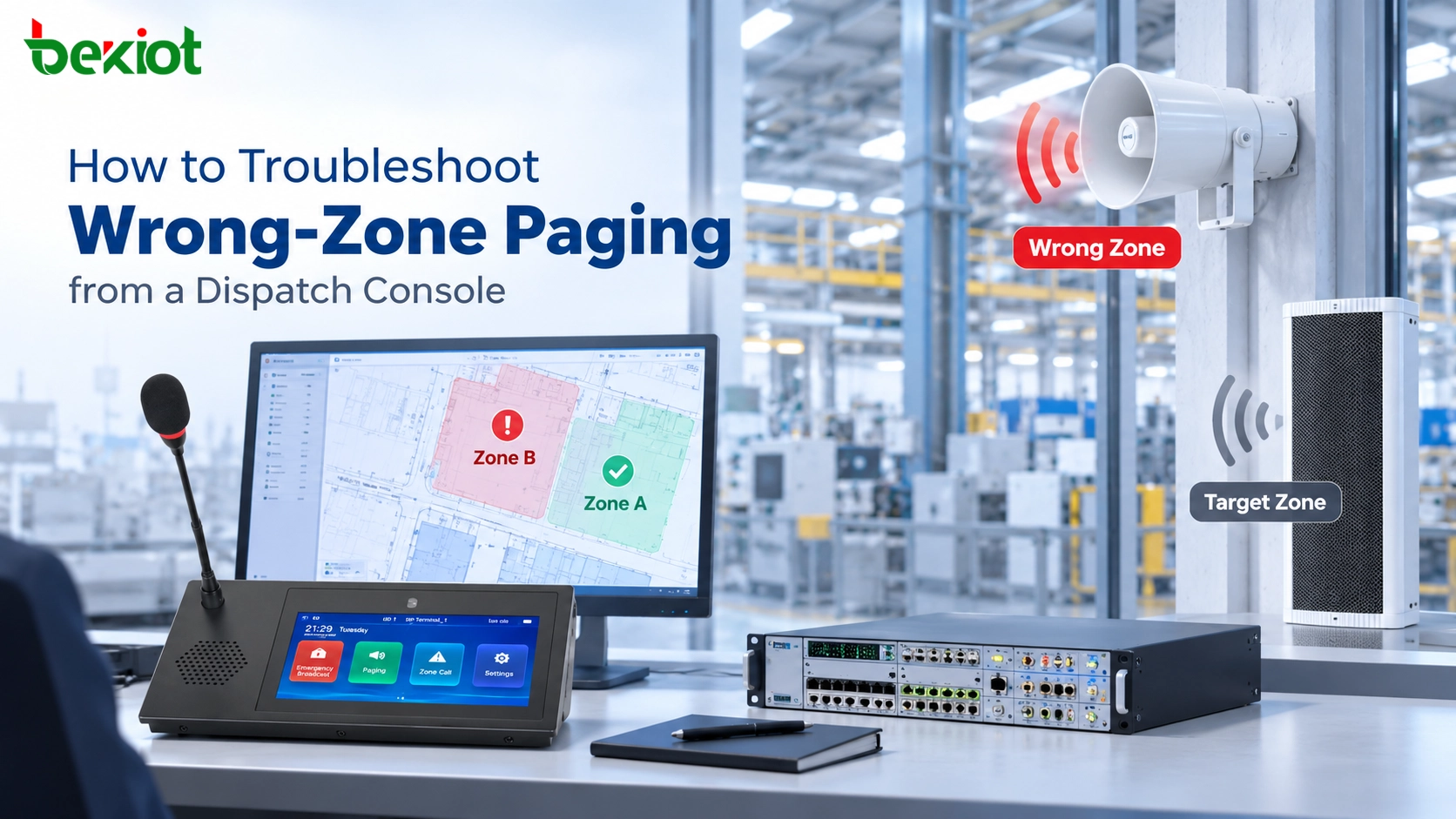
行業洞察
2026-10-15 17:55:01

如何對來自調度控制台的錯誤區域尋呼進行疑難排解

透過追蹤區域按鍵、SIP 路由、多播接收器與 PA 電路,對來自調度控制台的錯誤區域尋呼進行疑難排解,然後驗證修正。

貝克電信

如何對來自調度控制台的錯誤區域尋呼進行疑難排解

當操作員在調度控制台上選取一個尋呼區域,但公告卻由另一個區域或額外非預期的揚聲器重現時,就會發生錯誤區域尋呼。即使目標對應不正確,SIP 訊號與音訊品質在整個通話期間可能看起來正常。故障可能源自控制台按鍵、SIP 路由規則、尋呼群組、多播訂閱或類比 PA 輸出。

有效的疑難排解會找出所要求的目的地與實際重現公告的實體裝置之間最早的不符。本指南會沿著這條線索,跨越觸控螢幕調度控制台、SIP 伺服器、網路揚聲器與舊式放大器區域。它著重於隔離並修正錯誤路由,而不是重複一般區域設定或聲學驗收程序。

找出預期區域與實際區域在何處出現分歧

先精確定義故障。「錯誤區域」可能表示控制台顯示了錯誤標籤、SIP 平台將通話路由到錯誤群組、接收器播放了它不應訂閱的串流,或放大器啟動了錯誤的實體揚聲器電路。它們的補救方式各不相同。

擷取一次受控事件

在變更設定之前,記錄控制台型號、登入帳戶、顯示的區域名稱、選取的群組或捷徑、時間、通話或工作 ID,以及聽到聲音的實體位置。儲存畫面與日誌。確認涉及的是即時、錄製、排程或警報尋呼。

取得測試許可,使用明確無誤的非緊急訊息,並通知所有可能受影響區域的人員。不要只是為了重現故障而反覆啟動實際疏散群組。如果緊急警告受到影響,請遵循站點降級程序。

在開啟設定頁面之前先分類症狀

  • 只有一台控制台錯誤: 將其捷徑、快取區域清單、操作員帳戶與本機儲存的撥號規則,與已知正常的控制台進行比較。

  • 每台控制台都到達同一個錯誤區域: 檢查共用伺服器群組、撥號計畫轉譯,以及下游尋呼或 PA 控制器。

  • 預期區域與非預期區域都播放: 尋找重疊的群組成員資格、重複的串流訂閱、矩陣輸出或非預期音訊分配。

  • 只有在排程工作或警報之後才播放不同區域: 區分操作員的即時尋呼路由與已經作用中的自動化或優先順序路由。

  • 正確裝置處於作用中,但人員回報是隔壁房間: 在變更邏輯群組指派之前,檢查實體揚聲器位置與聲學溢漏。

在整個追蹤過程中保留一致的事件或工作參考:顯示標籤 → 命令或撥出的 URI → 伺服器決策 → 群組或媒體串流 → 端點或放大器通道 → 實體揚聲器電路。若沒有共同 ID,則關聯可靠的時間戳與來源身分。
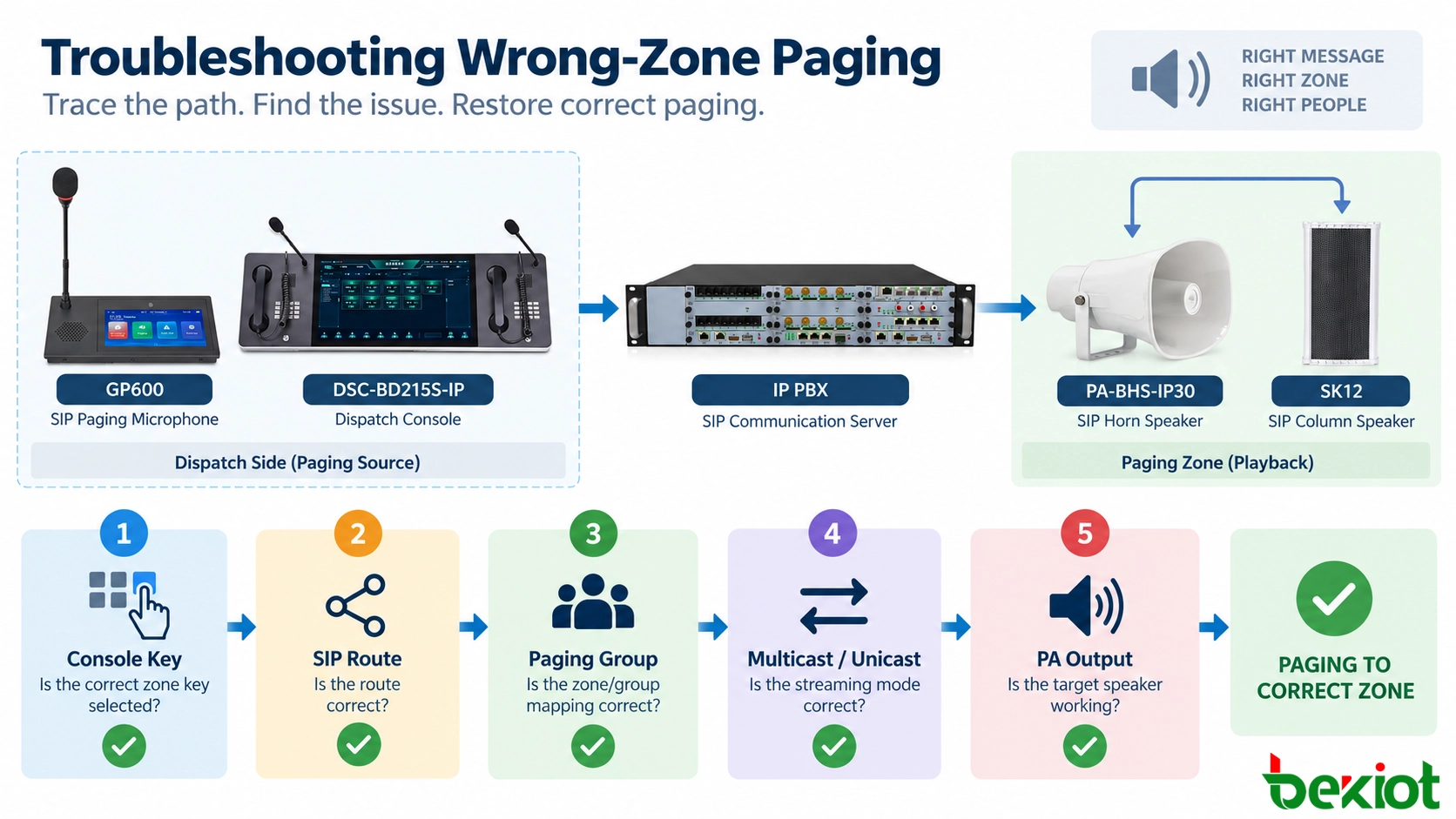
錯誤區域尋呼診斷決策樹,區分調度控制台對應、SIP 路由、揚聲器訂閱與類比 PA 配線

圖 1 - 從觀察到的症狀開始,並針對控制台對應、伺服器路由、媒體接收器與類比 PA 輸出分別進行檢查。

檢查控制台按鍵、區域清單與操作員設定檔

顯示的區域名稱不一定就是控制台送出的目的地。按鍵可以參照分機、群組 ID 或動作。重新命名的區域可能保留過時目標。

比較標籤與實際命令

開啟受影響按鍵或區域項目的設定,檢查其儲存的目標。例如,「Loading Bay」 可能仍在呼叫先前的倉庫分機。與已核准的區域登記表進行比較。

在獲得授權的情況下,將具名觸控螢幕動作與其文件化尋呼目的地的直接撥號進行比較。如果只有捷徑失敗,檢查控制台對應;如果兩者都失敗,則移至共用路由。直接撥號可能繞過群組邏輯或權限,這是診斷證據,而不是接受正常工作流程。

檢查使用者特定與複寫的設定

比較受影響與未受影響的操作員設定檔、複寫的控制台設定與用戶端快取版本。確認伺服器端區域變更確實已發佈到受影響席位。多個選取區域、鎖定按鍵與保留的全區域選擇,也可能解釋表面上的錯誤路由;在重設介面之前先記錄它們。

Becke Telcom 的 DSC-BD215S IP Dispatch Console 提供一個具有可自訂控制的觸控螢幕調度端點範例。DSC-173 IP Paging and Dispatch Console 是另一個選項;對應行為取決於已安裝的軟體。

相關產品: DSC-BD215S IP Dispatch Console

追蹤 SIP 撥號、平台路由與群組成員資格

如果控制台送出了預期目的地,請檢查伺服器對該要求的解析。區域標籤、SIP 路由與接收器成員資格可能分開儲存。

檢查有效目的地,而不只是通話結果

在可取得的情況下,依來源、時間與 Call-ID 找出 SIP 通話。檢查 Request-URI、撥號計畫轉譯與有效應用程式目的地。別名、租戶規則或前置字元可能將正確的短碼重新導向到過時群組。SIP 200 OK 確認某個通話分支已接受;它並不能識別最終重現音訊的揚聲器電路。

如果尋呼應用程式接受 API 命令而不是 SIP 撥號字串,請檢查命令承載與服務解析出的群組識別碼。遵循專案實際的服務路徑。

將群組解析為明確的端點清單

匯出或檢查事件發生時所選群組的有效成員資格。將端點 ID、站點名稱與放大器通道,與已核准的區域登記表進行比較。檢查已移動裝置、複製的設定檔、複製的群組與自動化規則。

在可取得時使用穩定的裝置識別碼。DHCP 位址與重複使用的分機不能取代實體位置記錄。檢查平台是否依排程、操作員角色或警報狀態套用動態成員資格。檢查有效設定,而不是範本。

實例:Production West 到達 Warehouse

設想一個假設工廠,操作員選取 Production West,但聽到來自 Warehouse North 的測試公告。已核准設定將 Production West 識別為 PW-02,其尋呼群組為 G-12。但調度服務改將 PW-02 解析為 G-14,該群組屬於 Warehouse North。

追蹤檢查點預期觀察到的證據
操作員選取Production West / PW-02控制台事件:PW-02
發出的要求PW-02調度要求:PW-02
伺服器群組解析G-12路由日誌:G-14
下游成員G-12 揚聲器清單G-14 倉庫成員
現場觀察可聽到 Production West可聽到 Warehouse North

第一個已證實的不符出現在 PW-02 到群組查詢。在觸碰揚聲器訂閱之前,匯出作用中的對應,與已核准修訂進行比較,並檢閱變更歷程。在變更控制下於擁有平台修正對應;不要只因為 G-14 倉庫揚聲器播放了,就編輯有效的 G-14 倉庫成員資格。

套用並發佈修復後,檢查 PW-02 現在是否解析為 G-12。然後從原始操作員登入重複尋呼,並另外測試 Warehouse North。範例識別碼與日誌欄位僅供說明,不是 Becke 特定命令或已示範的平台輸出。
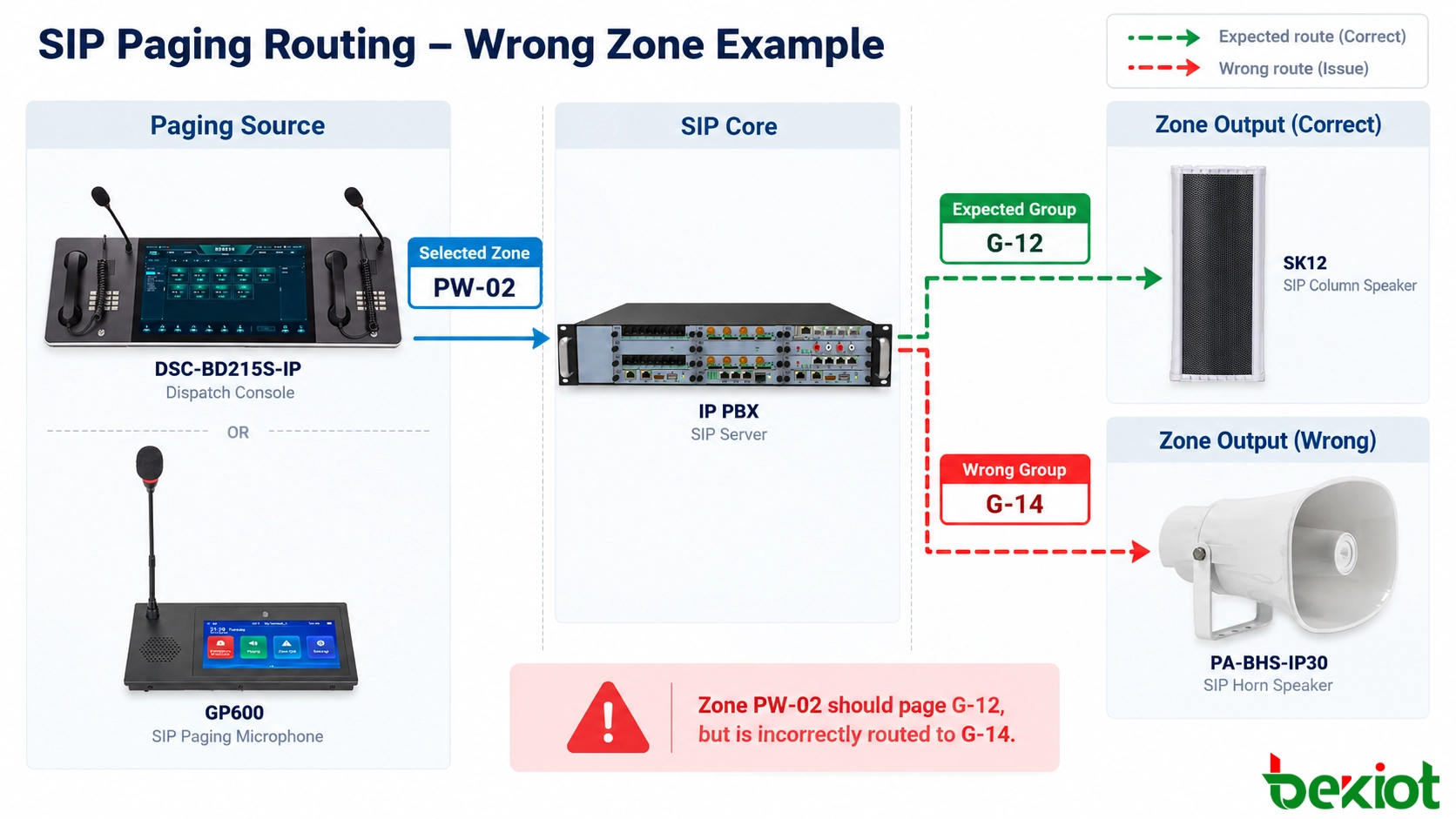
調度控制台 SIP 尋呼路由比較,包含預期群組 ID 與錯誤解析的端點群組

圖 2 - 預期的 PW-02 到 G-12 對應,與錯誤的 PW-02 到 G-14 伺服器解析進行比較;只有在路由建立後才檢查端點。

檢查網路音訊、訂閱與類比輸出

如果伺服器解析出正確目的地與群組,請向下游移動。現在針對所用傳輸,比較命令區域與實際媒體接收器。

單播:識別真正的媒體接收器

在單播設計中,尋呼伺服器可能為每個端點建立個別的 RTP 串流或 SIP 通話分支。將目的地位址與連接埠,與預期接收器清單進行比較。錯誤的媒體目標或複製的端點身分可能導致音訊錯誤定向。

目標接收器擷取可確認非目標端點是否確實收到 RTP。仍必須檢查接收器身分與配線;封包到達並不是可聽播放的證明。

多播:驗證群組位址與端點訂閱

對於多播尋呼,比較每個區域所設定的目的地多播位址與 UDP 連接埠。檢查非預期接收器的作用中訂閱或加入狀態,而不只是傳送者的工作狀態。重複的群組位址與過時訂閱可能導致播放錯誤定向。

檢查 IGMP 加入、窺探、查詢器運作與多播路由。網路泛濫可能將封包傳送到非預期的交換器連接埠,但單靠泛濫無法證明揚聲器已訂閱、解碼或播放該串流。在歸咎於交換基礎設施之前,先驗證其有效接收器設定。

Becke Telcom 網路揚聲器,例如 PA-BHS-IP30 SIP Horn Speaker 與 SK12 SIP Column Speaker,可在受支援的尋呼專案中作為現場端點。驗證每個已安裝型號與韌體所支援的訂閱與日誌。

舊式 PA:追蹤閘道、繼電器與放大器通道

當 SIP 尋呼饋送到現有類比 PA 設備時,所選分機可能終止於閘道、控制器或音訊矩陣。檢查閘道的輸出指派、繼電器接點、區域選取命令、放大器輸入與最終揚聲器電路。繼電器反接或揚聲器線路標示錯誤可能啟動錯誤區域。

合格技術人員應在受控點對點測試期間,將實際輸出與竣工電纜表進行比較。在檢查放大器或定電壓揚聲器配線之前,遵循電氣隔離與當地安全程序。

排除共用來源與聲學效應

檢查背景音樂、排程音訊或緊急優先串流是否佔用了目的地。比對事件 ID 與時間,以排除同時公告。聲音穿過開放空間並不是群組對應錯誤。

修正第一個不符並執行回歸測試

一旦第一個不符有日誌或量測支持,就以最小已核准變更修正負責層。備份相關控制台設定檔、撥號計畫、群組定義、訂閱或 PA 矩陣。多個同時編輯會使根本原因與回復難以驗證;下游也可能仍有其他故障。

使用精簡故障隔離矩陣

觀察到的症狀第一個決定性比較可能故障領域
一台控制台選取區域 A 但送出區域 B可見標籤與發出的命令捷徑、巨集、設定檔或過時用戶端對應
所有控制台送出 A,伺服器選取 B要求或事件 ID 與解析出的群組PBX 撥號計畫或調度路由表
群組正確,但額外 SIP 揚聲器播放有效成員資格與接收器媒體/訂閱群組記錄或終端設定
網路端點正確,但錯誤類比區域發聲閘道輸出與放大器及電纜表繼電器、PA 矩陣或實體揚聲器電路
錯誤區域回報只在另一項工作期間發生重疊的事件 ID、媒體來源與優先順序狀態同時排程、警報或覆寫路徑

重新測試一個目標、其鄰近區域與每個受影響來源

修正後,從原始操作員登入與控制台測試受影響目的地。確認顯示、命令、解析出的群組與作用中接收器。也尋呼鄰近區域,使修復不會移除有效成員資格。

重複相關案例:個別尋呼、已核准的多區域尋呼、受限的全區域動作,以及任何共用已變更對應的排程或警報觸發路徑。比較已開啟與新登入的調度工作階段。確認預期區域播放且非預期接收器保持不作用;僅僅還原原始捷徑並不夠。

記錄根本原因並防止再次發生

記錄預期與錯誤區域、根本原因、日誌、已核准變更、回復與重新測試。只有在檢查相關區域並確認緊急功能仍可使用,或已有文件化補償措施後,才關閉事件。

保留受控區域登記表,將穩定 ID 連結到建築物、端點與 PA 輸出。區域移動、重新命名區域、軟體範本匯入與重新配線需要目標負向測試,以及對預期群組的成功呼叫。

在混合工業安裝中,GP600 SIP Paging Microphone 可與調度控制台一起提供另一個授權區域選取介面。比較產生的伺服器端命令,有助於隔離操作員介面問題,前提是兩者使用相同的預期服務與權限。這些介面不需要行為完全相同。
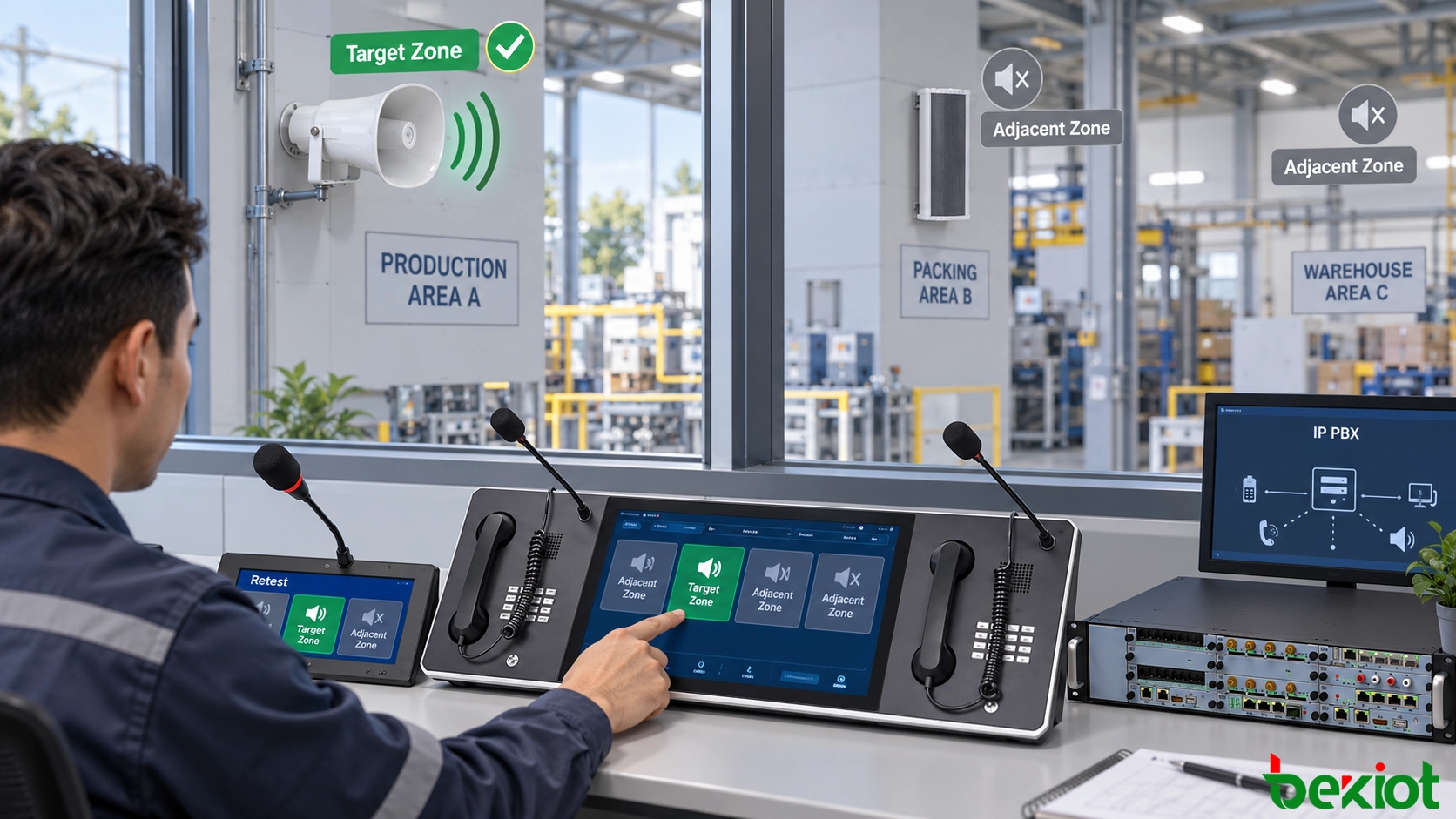
工業控制室技術人員使用調度控制台、號角揚聲器與區域邊界,重新測試修正後的 SIP 尋呼區域

圖 3 - 在對應修正後,於受控現場條件下驗證目標、鄰近區域與替代調度來源。

常見問題

兩個尋呼區域可以刻意共用同一個實體揚聲器嗎?

可以,前提是設計明確允許重疊涵蓋或成員資格。共用揚聲器應在每個允許區域中具有文件化角色,並定義兩個來源同時向其尋呼時的結果。未文件化的重疊不能安全地假定為正確。

為什麼錯誤區域問題可能只在伺服器容錯移轉後出現?

作用中與待命節點可能使用不同版本的路由表、區域資料庫或佈建設定檔。檢查同步與容錯移轉路由。使用受支援程序重新同步,並重新測試兩個節點。

為什麼修正後的尋呼區域在裝置重新開機後會還原?

作用中變更可能只儲存在執行中設定,而自動佈建在啟動時還原較舊設定檔。檢查裝置的佈建設定來源、範本版本、集中管理原則與啟動日誌。透過受支援程序更新權威設定,然後在受控時間窗內重新啟動並重新測試。

多語言操作員畫面上的區域名稱應如何處理?

使用一個穩定的內部區域識別碼,並維護對應到它的已審查語言特定顯示標籤。區分相似站點名稱。驗證語言變更與匯入,而不改變底層目的地 ID 或操作員授權。

如果安全警告被送到錯誤區域,操作員應該怎麼做?

立即遵循站點的緊急通訊與降級程序。若獲得授權,停止或修正錯誤公告,通知負責控制室或安全主管,並透過已核准替代路徑傳遞所需訊息。保留證據並維護已核准的備用警告路徑。
推薦產品
目錄
客服 電話
We use cookie to improve your online experience. By continuing to browse this website, you agree to our use of cookie.

Cookies

This Cookie Policy explains how we use cookies and similar technologies when you access or use our website and related services. Please read this Policy together with our Terms and Conditions and Privacy Policy so that you understand how we collect, use, and protect information.

By continuing to access or use our Services, you acknowledge that cookies and similar technologies may be used as described in this Policy, subject to applicable law and your available choices.

Updates to This Cookie Policy

We may revise this Cookie Policy from time to time to reflect changes in legal requirements, technology, or our business practices. When we make updates, the revised version will be posted on this page and will become effective from the date of publication unless otherwise required by law.

Where required, we will provide additional notice or request your consent before applying material changes that affect your rights or choices.

What Are Cookies?

Cookies are small text files placed on your device when you visit a website or interact with certain online content. They help websites recognize your browser or device, remember your preferences, support essential functionality, and improve the overall user experience.

In this Cookie Policy, the term “cookies” also includes similar technologies such as pixels, tags, web beacons, and other tracking tools that perform comparable functions.

Why We Use Cookies

We use cookies to help our website function properly, remember user preferences, enhance website performance, understand how visitors interact with our pages, and support security, analytics, and marketing activities where permitted by law.

We use cookies to keep our website functional, secure, efficient, and more relevant to your browsing experience.

Categories of Cookies We Use

Strictly Necessary Cookies

These cookies are essential for the operation of the website and cannot be disabled in our systems where they are required to provide the service you request. They are typically set in response to actions such as setting privacy preferences, signing in, or submitting forms.

Without these cookies, certain parts of the website may not function correctly.

Functional Cookies

Functional cookies enable enhanced features and personalization, such as remembering your preferences, language settings, or previously selected options. These cookies may be set by us or by third-party providers whose services are integrated into our website.

If you disable these cookies, some services or features may not work as intended.

Performance and Analytics Cookies

These cookies help us understand how visitors use our website by collecting information such as traffic sources, page visits, navigation behavior, and general interaction patterns. In many cases, this information is aggregated and does not directly identify individual users.

We use this information to improve website performance, usability, and content relevance.

Targeting and Advertising Cookies

These cookies may be placed by our advertising or marketing partners to help deliver more relevant ads and measure the effectiveness of campaigns. They may use information about your browsing activity across different websites and services to build a profile of your interests.

These cookies generally do not store directly identifying personal information, but they may identify your browser or device.

First-Party and Third-Party Cookies

Some cookies are set directly by our website and are referred to as first-party cookies. Other cookies are set by third-party services, such as analytics providers, embedded content providers, or advertising partners, and are referred to as third-party cookies.

Third-party providers may use their own cookies in accordance with their own privacy and cookie policies.

Information Collected Through Cookies

Depending on the type of cookie used, the information collected may include browser type, device type, IP address, referring website, pages viewed, time spent on pages, clickstream behavior, and general usage patterns.

This information helps us maintain the website, improve performance, enhance security, and provide a better user experience.

Your Cookie Choices

You can control or disable cookies through your browser settings and, where available, through our cookie consent or preference management tools. Depending on your location, you may also have the right to accept or reject certain categories of cookies, especially those used for analytics, personalization, or advertising purposes.

Please note that blocking or deleting certain cookies may affect the availability, functionality, or performance of some parts of the website.

Restricting cookies may limit certain features and reduce the quality of your experience on the website.

Cookies in Mobile Applications

Where our mobile applications use cookie-like technologies, they are generally limited to those required for core functionality, security, and service delivery. Disabling these essential technologies may affect the normal operation of the application.

We do not use essential mobile application cookies to store unnecessary personal information.

How to Manage Cookies

Most web browsers allow you to manage cookies through browser settings. You can usually choose to block, delete, or receive alerts before cookies are stored. Because browser controls vary, please refer to your browser provider’s support documentation for details on how to manage cookie settings.

Contact Us

If you have any questions about this Cookie Policy or our use of cookies and similar technologies, please contact us at support@becke.cc .