
SIP電話數字採集和撥號規則手冊涵蓋撥號計劃/撥號對等配置、8種撥號模式、E.164規則、BX3S/BX4/BX5S/BX6/BX7/BX7C/GP210/GP210i/BXU系列的自定義撥號計劃,內部研發和測試團隊的輕鬆網絡設置。
針對C系列IP話機,撥號方案與撥號對等體功能大致可滿足使用者對於號碼發送及替換規則的所有需求。然而新使用者或是長期未使用此兩項功能的人員,難以在不參考使用者手冊的情況下,僅透過網頁介面完成設定。即便透過手冊學習設定方式,也會很快遺忘操作步驟。因此我們優化此兩項功能,讓使用者可直接透過網頁介面熟悉設定流程,或至少在閱讀一次手冊後,長期保留設定能力。
本文件適用於BX3S、BX4、BX5S、BX6、BX7、BX7C、GP210、GP210i、BXU系列及其他機種。
本文件供內部研發與測試人員參考,用以瞭解撥號方案功能的強化內容。
撥號方案:話機自動辨識特定格式號碼並主動發起通話的功能。
號碼對應規則:為符合撥號方案需求所定義的字元序列規則。
撥號對等體:將符合特定格式的號碼,路由至指定設備或網路的功能。
X34 支援 8 種撥號模式:
# 鍵撥號:輸入目標號碼後按下 # 鍵發起通話;
固定長度撥號:輸入號碼達到設定位數時,話機自動撥號(撥號模式下生效);
逾時撥號:等待時間結束後,話機自動發起通話(撥號模式下生效);
# 後置盲轉:輸入轉接號碼並按下 # 鍵,將目前通話轉接給第三方;
掛機盲轉:輸入轉接號碼後掛上聽筒或關閉免持,完成通話轉接;
掛機協助轉接:掛上聽筒或按下免持鍵,完成協助式通話轉接;
會議掛機協助轉接:三方會議中掛機,其餘兩方維持通話連線;
DSS 鍵盲轉:於快速鍵記憶體預設號碼,按下轉接鍵再按 DSS 鍵,直接轉接通話。
X56 支援 8 種撥號模式:
# 鍵撥號:輸入目標號碼後按下 # 鍵發起通話;
固定長度撥號:輸入號碼達到設定位數時,話機自動撥號(撥號模式下生效);
逾時撥號:等待時間結束後,話機自動發起通話(撥號模式下生效);
# 後置盲轉:輸入轉接號碼並按下 # 鍵,將目前通話轉接給第三方;
掛機盲轉:輸入轉接號碼後掛上聽筒或關閉免持,完成通話轉接;
掛機協助轉接:掛上聽筒或按下免持鍵,完成協助式通話轉接;
會議掛機協助轉接:三方會議中掛機,其餘兩方維持通話連線;
啟用 E.164
安卓話機支援 8 種撥號模式:
# 鍵撥號:輸入目標號碼後按下 # 鍵發起通話;
固定長度撥號:輸入號碼達到設定位數時,話機自動撥號(撥號模式下生效);
逾時撥號:等待時間結束後,話機自動發起通話(撥號模式下生效);
# 後置盲轉:輸入轉接號碼並按下 # 鍵,將目前通話轉接給第三方;
掛機盲轉:輸入轉接號碼後掛上聽筒或關閉免持,完成通話轉接;
掛機協助轉接:掛上聽筒或按下免持鍵,完成協助式通話轉接;
會議掛機協助轉接:三方會議中掛機,其餘兩方維持通話連線;
啟用 E.164
使用 # 鍵撥出:輸入目標號碼,於結尾按下 # 鍵完成撥號。
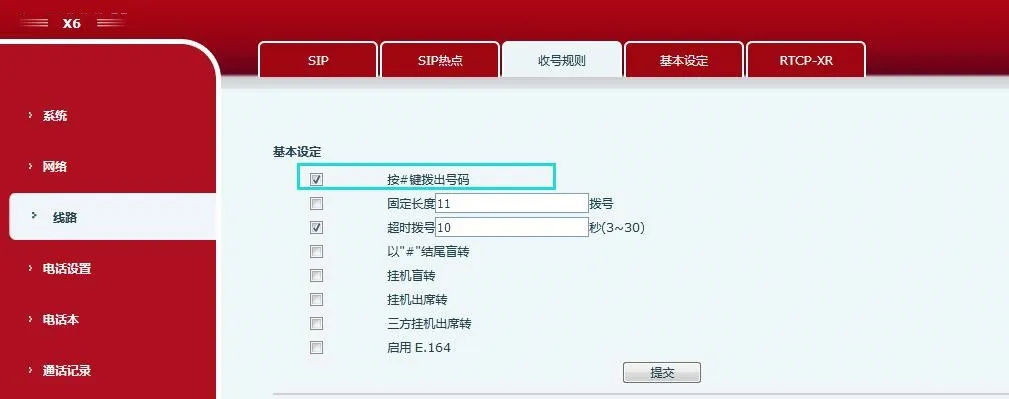
設定話機,以 # 鍵做為號碼輸入結束條件。
固定長度撥號:話機依設定位數截取並辨識輸入號碼。
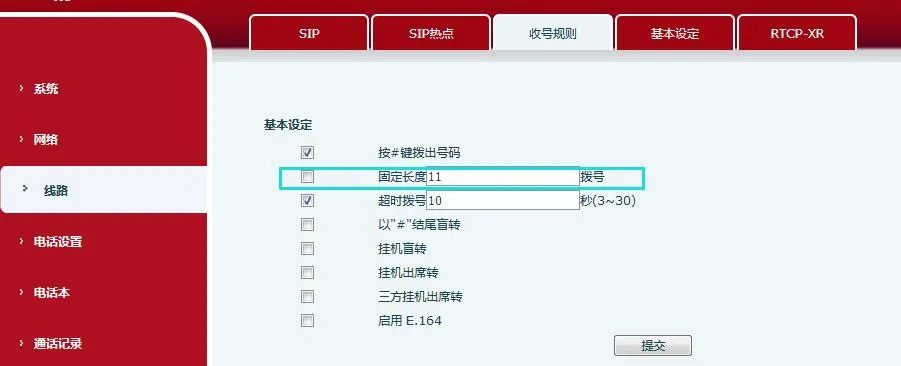
設定固定位數的號碼擷取規則。例如設定為 11 位:使用者輸入完畢後,話機自動以 11 位號碼發起通話。
逾時撥號:達到等待秒數後,自動送出已輸入之號碼。
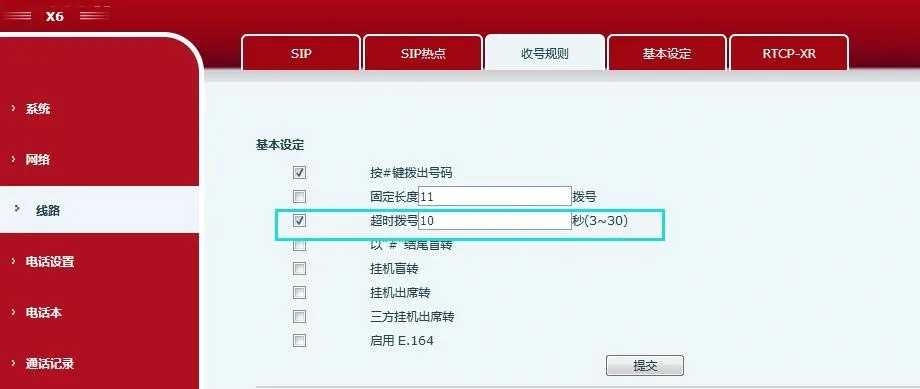
以秒為單位設定撥號逾時時間。例如設定 10 秒:若輸入號碼後 10 秒內無新按鍵,話機判定輸入完成並自動撥號。
# 後置盲轉
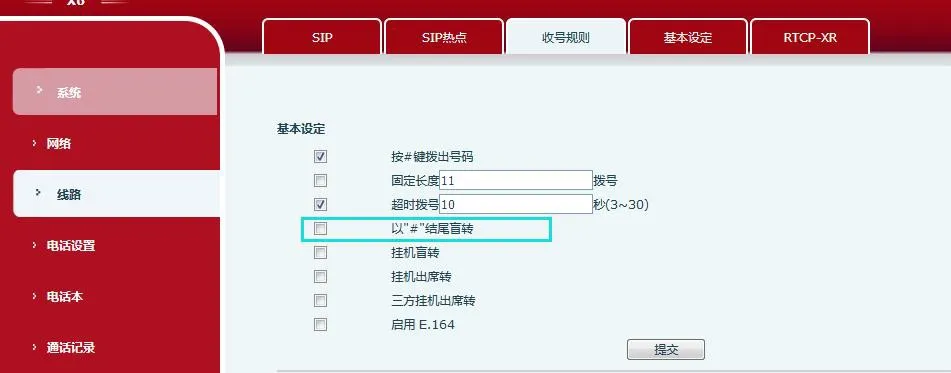
勾選此選項,可於轉接介面輸入號碼後按 # 鍵執行盲轉;取消勾選則停用此功能。
掛機盲轉
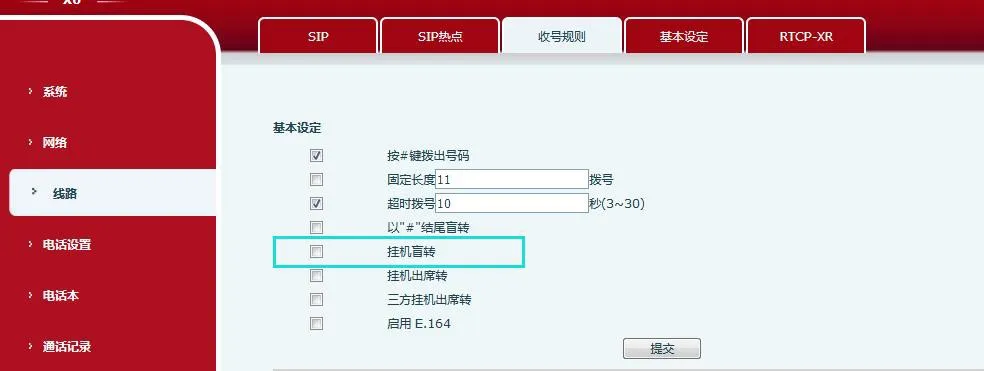
勾選此選項,於轉接介面輸入號碼後掛機,即可完成盲轉作業。
掛機協助轉接
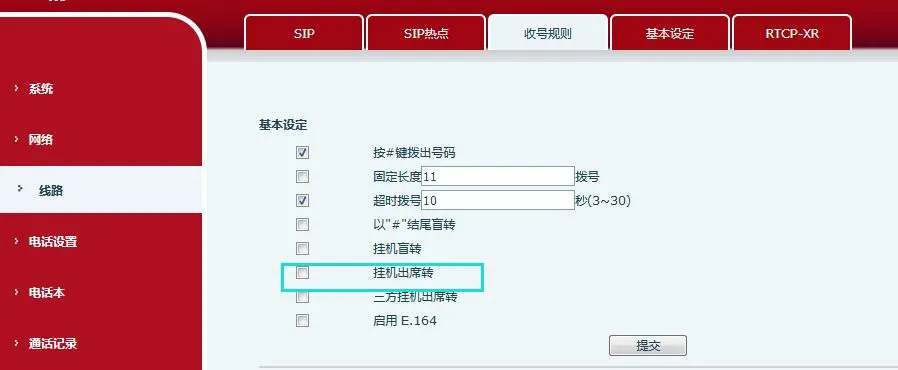
勾選啟用協助轉接:輸入轉接號碼並撥打,待對方接听後掛機,即可完成轉接。
三方會議掛機協助轉接
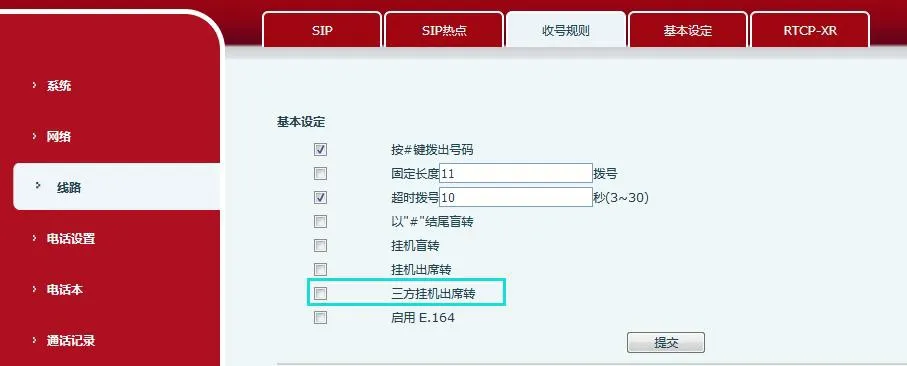
測試說明:話機與乙方、丙方建立三方會議。本機掛機(免持模式按免持鍵、耳機模式按耳機鍵、聽筒模式掛上聽筒),掛機後其餘雙方維持通話,實現互相顯示號碼的協助轉接。
啟用 E.164
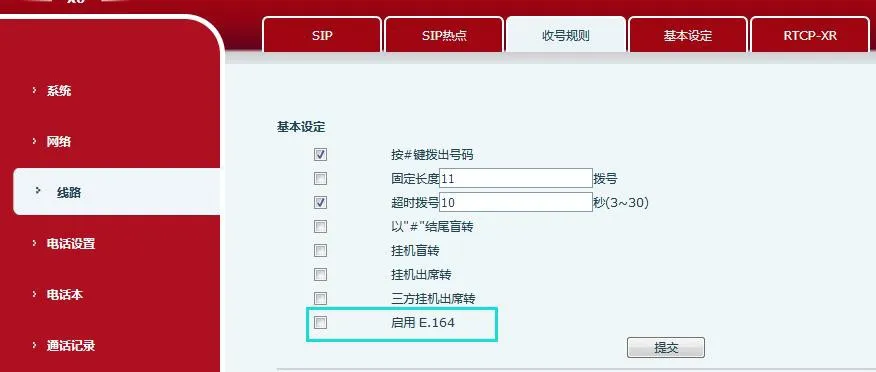
0 開頭號碼規則
00 開頭:無特殊處理(多用於國際號碼或 0086 格式);
010 開頭:本地市話 8 位,輸入 11 位後自動撥號;
013/015/018 開頭:行動號碼,輸入 12 位後自動撥號;
02 開頭:除 026、021 以外,輸入 11 位後自動撥號;
08 開頭:0812/0813/0816/0817、0825/0826/0827、083、085、087、0883/0886/0887/0888、089 於 11 位自動撥號(0850、0890、0899 無效);0898 於 12 位自動撥號。
其餘 03、04、05、06、07、09 等開頭區段,皆依原廠規範之地區專屬自動撥號位數規則執行。
其他開頭號碼
以 1、4、8、9 開頭之號碼:
1 開頭:
10xxxx:輸入 5 位自動撥號(例:10086);
11 開頭:111 為 5 位自動撥號;其餘 11 開頭為 3 位自動撥號(例:110);
12 開頭:123 為 5 位自動撥號;其餘 12 開頭為 3 位自動撥號(例:120、122);
13/15/18:11 位行動號碼自動撥號;
400/800:10 位免付費客服專線自動撥號;
9 開頭(999 除外):5 位自動撥號;999 為 9 位自動撥號。
備註:2、3、5、6、7 開頭號碼不進行自動處理。
若同時啟用 E.164 規則與自訂撥號方案,將優先執行第一筆符合條件的規則。
DSS 鍵盲轉
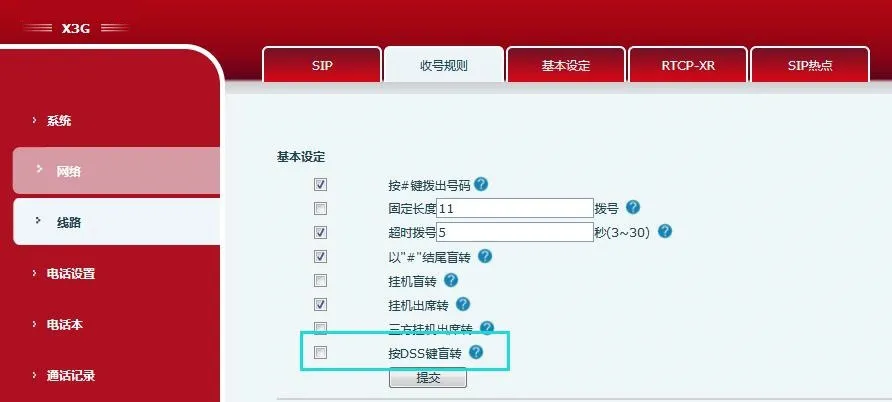
於功能鍵記憶體內儲存號碼,按下【轉接】鍵後再按 DSS 快速鍵,即可直接轉接目前通話。
使用者可透過這些規則快速設定個人化撥號與伺服器相容參數,大幅提升話機操作便利性,最多可新增 100 筆自訂規則。
| 參數 | 說明 |
| 撥打號碼 | 兩種比對模式:完全相符(號碼完全一致才套用對應IP);前置相符(前置碼後加入 T 以啟用市話區碼功能)。最多 30 位數字。 |
| 目標位址 | 目標 IP 位址;點對點通話請輸入對端設備 IP。 |
| 連接埠 | 對端信號連接埠(選填,預設 5060)。 |
| 前置碼 | 別名(選填):用來取代對端號碼前置之字串。 |
| 後置碼 | 後置字串(選填):自動加在撥號號碼末端。 |
| 套用範圍 | 撥出、撥入、全部。 |
| 比對後送出 | 是/否。 |
| 刪除長度 | 從號碼開頭刪除或取代的位數(選填)。例如:輸入 3 = 刪除前 3 位。 |
| 別名模式(搭配刪除長度共 4 種): 1) add:xxx - 前方新增 xxx 2) all:xxx - 取代完整號碼 3) del - 刪除前 N 位 4) rep:xxx - 前 N 位取代為 xxx | 萬用字元: x = 任意數字 [ ] = 數字範圍 . = 任意長度(包含空白) Tn = n 秒後停止擷取(0-9,最後兩碼,預設 T0) , = 停止擷取 + 撥號音 |
X5/6:
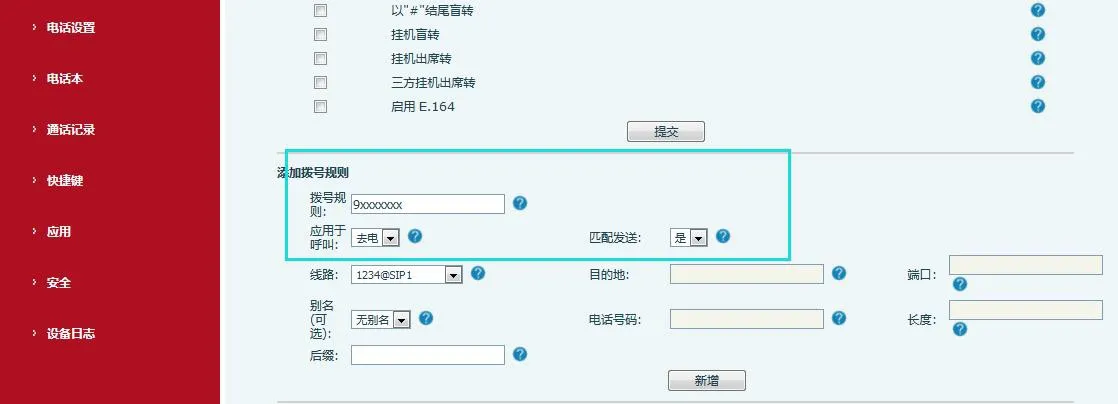
撥號規則:自訂撥號設定
套用範圍:撥出/撥入/全部
比對後送出:是/否(預設為是);線路:自動/SIP1/SIP2/SIP3…
目標位址:自動模式保留空白;其他線路填入 IP;連接埠:自動模式保留空白
別名(選填):關閉/全部/新增/刪除/取代;自訂長度:關閉時留空
後置碼:設定自訂結尾字串
撥號規則管理:編輯/刪除規則
自訂撥號規則列表:顯示所有已設定規則
X3/4:
號碼:設定目標撥號號碼
目標/連接埠(選填):設定對端 IP 與連接埠
後置碼(選填):自訂撥號後綴
刪除長度(選填):指定欲刪除之位數
撥號對等體選單:編輯/刪除規則
撥號對等體列表:顯示所有已設定規則
視訊話機:
撥號規則:自訂撥號設定
套用範圍:撥出/撥入/全部
比對後送出:是/否(預設為是);媒體:預設/音訊/視訊;線路:自動/SIP1/SIP2/SIP3…
目標位址:自動模式保留空白;其他線路填入 IP;連接埠:自動模式保留空白
別名(選填):關閉/全部/新增/刪除/取代;自訂長度:關閉時留空
後置碼:設定自訂結尾字串
撥號規則管理:編輯/刪除規則
自訂撥號規則列表:顯示所有已設定規則
X3/4 範例:
範例 1:全域取代
撥打「32」→自動取代為「833333」(快速撥號)。撥打「322」→僅送出原始號碼。
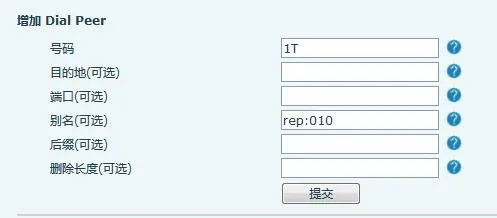
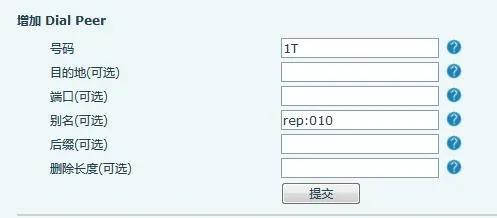
範例 2:局部取代
撥打「162213123」→自動轉換為「01062213123」(加入北京區碼 010)。
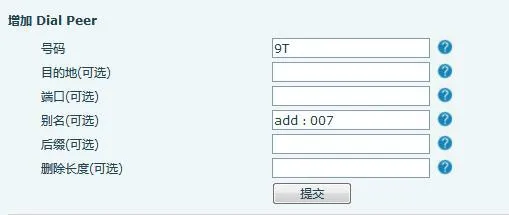
範例 3:新增前置碼
撥打「9312」→送出「0079312」。
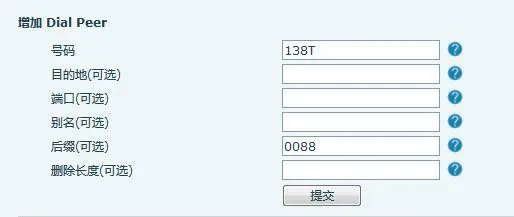
範例 4:新增後置碼
撥打「1383322」→送出「13833220088」。
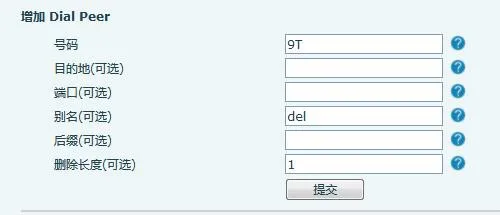
範例 5:刪除前置碼
撥打「98322」→送出「8322」(移除開頭 9)。
X5/6 與視訊話機範例:
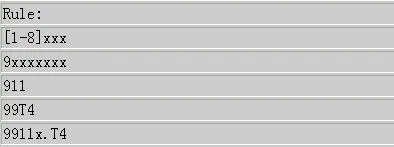
範例 1:[1-8]xxx → 1000–8999 所有 4 位號碼,輸入 4 位立即送出。
![[1-8]xxx 規則設定](/uploads/allimg/20260410/1-26041010594I19.webp)
範例 2:9xxxxxxx → 9 開頭 8 位號碼,輸入滿 8 位立即送出。
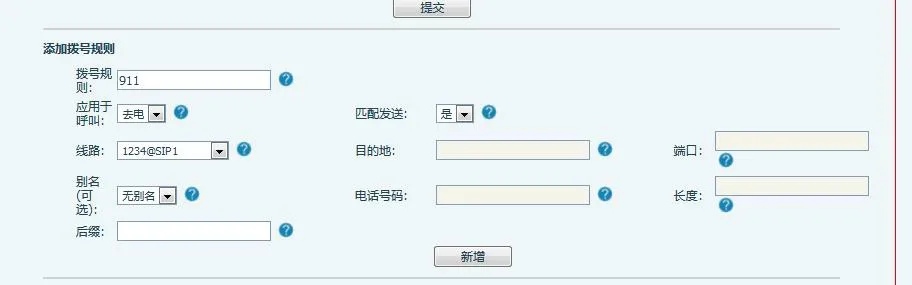
範例 3:911 → 撥號完成立即送出。
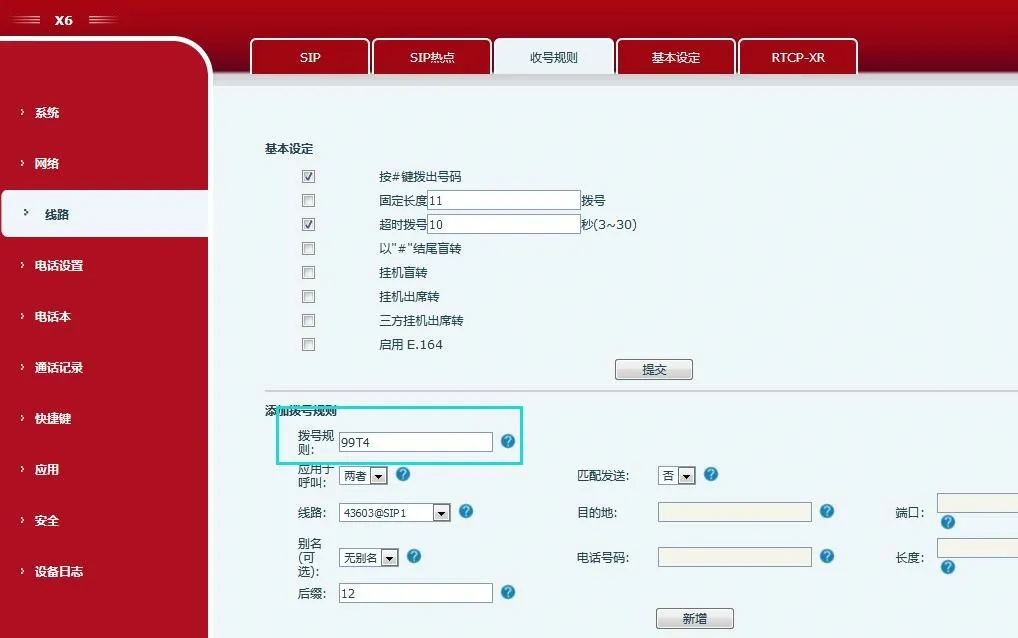
範例 4:99T4 → 輸入 99 後延遲 4 秒送出。
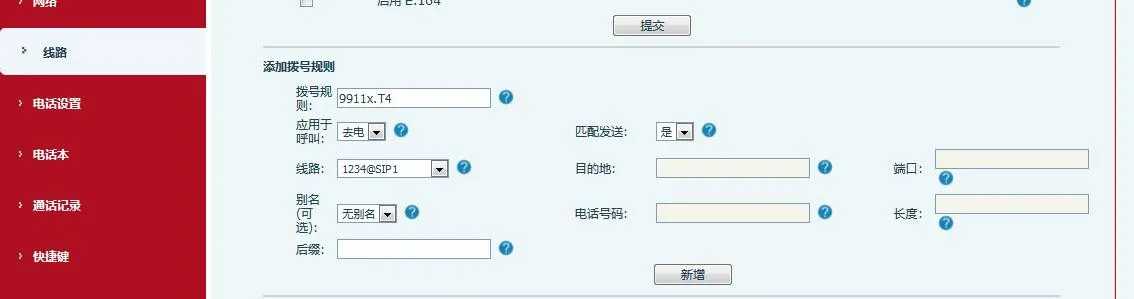
範例 5:9911x.T4 → 9911 開頭號碼(最少 5 位),等待 4 秒後送出。
備註 1:多筆規則同時符合時,優先套用最早建立的規則。
備註 2:單一號碼僅能匹配一筆自訂規則,多重比對會造成規則失效。